Ads (Ujoin)

顯示包含「Apps (Recommend)」標籤的文章。顯示所有文章

2011年4月18日星期一

[Apps] Ghost Radar Classic 測鬼雷達

  • 【免費】iphone / Ghost Radar Classic 測鬼雷達 。(圖/Apple Store)

記者劉文齡/台北報導

怕鬼嗎?生活週遭常感覺陰風陣陣,寒意從腳底竄升,是否身邊多個「他」?快用iPhone上的Ghost Radar Classic軟體,幫你感應附近的磁場乾不乾淨。

Ghost Radar Classic測鬼雷達幫你檢測環境中的「超自然活動」,藉由軟體內特殊器材的編碼,聲音與震動的頻率,利用科學的換算,去讀取異常的數據,進而得到人體 所感應不到的「電磁波」。掃描中的數據,不代表真正鬼魂的存在,只是當下電磁波的訊號異常,在充滿電器的環境,軟體也會偵測到特殊的電波。現在,快來偵測 看看你週遭的「狀況」吧!

(1)↓圖說:進入Ghost Radar Classic測鬼雷達後,訊號就開始搜尋你身旁的電波,這款軟體有聲音做輔助,提供你收尋的進度,提醒你異常的警示。(圖/Apple Store)


(2)↓ 圖說:分就不同數字的轉動,來說明數字轉換的意義。「A」代表三種不同解讀器所讀到數據的決策,最上層的數字被追蹤會不停的轉換,第三層的數字是對第一層 數據的解讀,它會跟隨第一層的變換做改變,中間則是上下層數據的加總,所做的最後解讀。「B」是你與電磁波間的溝通,軟體把電磁玻所要表達的意思,變成我 們可以理解的「口頭語言」,這樣你就可以了解「他」們所要表達什麼。(圖/Apple Store)


(3)↓ 圖說:「C」光點的顏色代表信號的強度,紅色信號最強,再來是黃色、緊接著是綠色,而藍色的信號則是最微弱的。「D」軟體的數據與電磁波做溝通,就由溝通 的讀數選擇字母。其中軟體顯示「- - -」代表沒有活動;而「。。。」則表示磁場活動強烈。(圖/Apple Store)


(4)↓圖說:感應週遭的磁波來看看身處的環境,不代表真的有鬼魂的存在,有可能是電器所釋放的能量,無須驚慌與害怕,這款軟體是帶有科技與娛樂效果的!(圖/Apple Store)


Ghost Radar Classic使用影片:


馬上下載:《iPhone ∕ Ghost Radar Classic》

2011年4月4日星期一

[iOS Apps] Vimeo 官方軟件


網上短片分享平台以 YouTube 為主,其次就是 iMovie 也支援的 Vimeo。不過,iMovie 的 iOS 軟件定價 4.99 美元,雖不算昂貴但亦不是人人願意付錢購買。Vimeo 近日就在 App Store 推出了官方軟件,不但免費,更支援進階剪輯功能,絕不失禮。
Vimeo for iPhone 為一個一站式平台,可以讓用戶(必需先註冊為 Vimeo 會員)瀏覽自己的戶口資訊、瀏覽影片、以至拍攝、剪輯和上載製成品。拍攝版面為全熒幕模式、有格線參考及對焦操控等。至於剪輯功能,一般的過場效果、標 題、視覺濾鏡、背景音樂、錄音等都一應俱全,完成後可選擇輸出到 iPhone 的 Camera roll 儲存,或者上載到 Vimeo 平台分享。要留意的是 Vimeo 在上載影片時流量限制,免費會員每星期只有 500MB,需求高的需要付費成為 Plus 會員。不過,軟件本身是免費的,又可以輸出檔案,沒理由不下載吧!

官方教學短片

軟件下載:在App Store內搜尋「Vimeo」 或到 iTunes App Store
QR Code下載:

軟件價格:免費
適用環境:iPhone、iPod touch(第四代)、iPad 2
系統要求:iOS 4.0.1 +
檔案大少:20.1 MB
目前版本:1.0

(Quoted from unwire.hk)

2011年3月26日星期六

Erase the social network past with Last Night Never Happened

Let's be honest: We all enjoy a good night out on the town occasionally, and when fun happens these days, chances are you might say or post something on various social networks that you probably shouldn't, be that something negative about your boss or your ex, or just a little too much information about your current state of mind. Now there's an iPhone app that purports to deal with exactly these lapses in judgement.
Last Night Never Happened is an iPhone app that, when given access to your Facebook and/or Twitter accounts, will delete or replace any social network postings that you happen to regret. The app will go back up to 48 hours, and as you can see in the demo, will clear out any photos, tweets, or Facebook posts you need to delete, optionally replacing them with a much nicer message.
Unfortunately, the app doesn't do any more than Twitter or Facebook, so all of those OK Cupid messages you sent are there to stay. And according to the fine print on the app, it doesn't do Facebook's status updates either, so you'll have to go deal with those yourself. But if you often find yourself regretting messages you sent and posted the night before, Last Night Never Happened may be able to help. It's $1.99 on the App Store right now.

(Quoted from Tuaw)

2011年3月24日星期四

[iOS Apps] A simple, beautiful, wonderful reminder app for iOS devices


Perhaps the most important of the distinguishing factors of the App Store and iOS development is the insanely high quality of apps. Not all apps -- not by a long shot -- but the ones that are made with care and attention are truly wonders of form and function wrapped in a gorgeous shell. Due is one of those apps. It takes the mundane task of setting a quick reminder and makes it easier than using a calendar app and more, dare I say it, fun than it should be. No tricks, just good solid design and all the functions you need within easy reach.

Functionality

Make no mistake, Due is just a to-do list with timers, so if you're looking for something else, Due isn't for you. But if you ever used Diddlebug on the ancient Palm OS, this is as close as I've found (with Diddlebug you drew on the screen and added a timer). Why there's no iOS version of Diddlebug is beyond me, even a crappy 8-bit version would suffice. At any rate, Due allows you to create a timed reminder with a default notification and chime within about 4 or 5 taps, depending on some options. Four if you accept the default timed "on the next quarter hour." You can adjust the default time interval in the app's settings, from 1 minute to 30.
Reminders, once created, go in a queue. Tapping on a reminder allows you to set whether or not snoozing is allowed, if you want a reminder to repeat, chime options and if you want to reschedule this for 10 minutes, 1 hour or 1 day later. All of that in a submenu, and it's quite intuitive to boot. Swiping a reminder allows you to delete it.
An example of the app's lovely attention to detail: when you go to set a reminder, there are four "default time" buttons which correspond to when you wake up, what time you eat lunch, when you leave work and just before bedtime.

Gallery: Due for iOS

Timers, the other part of Due, are even simpler: just a simple countdown timer in a list with a cool switch graphic. You can make your own, but three examples are included.
Once you dismiss a reminder, it goes to the Logbook, which is a sort of recycling center. You can quickly reset the timer for another time in a pop-up menu with three presets and a customize option. Or you can swipe your finger and delete the reminder forever.

Sounds

The default alarm sound is a pleasant chime. You can set a secondary alert in the app's settings. You can also turn off the sound effects in the app, although I found the ticking and clicking added to the beauty of this app. There are only eight alert sounds, but they are designed to be loud and long. You can choose from sounds like Beep, which is a very loud beep on my iPhone's tiny speaker but lasts only 1 second, or Wind Chimes, which are somewhat softer but last 30 seconds.

Settings

First, the settings are accessed through the Logbook, which I found a little odd. But the settings you get in Due are plentiful and useful. Several powerful defaults can be changed here, including a default due date, default snooze period and the minute interval for setting reminders. You can also set the time you wake up, go to lunch, etc.
But wait, there's more! Backup and sync. Yes, the app will backup its own database and let you revert to that saved state within the app. You can restore within the app or email your database. With sync, you can link your database to Dropbox -- which is heavenly.

Conclusion

If you find the iPhone's built-in Calendar app clunky and you just need simple timed reminders, Due is simply a must-have app. From its intuitive and beautiful design to its simple functionality and powerful customization options, you won't regret the $3 for such a well-made app, compatible with the iPad, iPhone and iPod touch. Check out Due's website (itself a thing of beauty) and see more demos of the app in action.

(Quoted from Tuaw)

2011年3月23日星期三

iTunes 圖示變身唱片封套


透過 CoverSutra、TunesArt 一類的軟件,用戶可將 iTunes 當前播放的歌曲 Album Art 展示於桌面上,但它們很容易被其他視窗覆蓋,置頂顯示又怕會阻礙視線。其實 iTunes 亦支援外掛,只要安裝相關 Plug-in,Dock 上的 iTunes 圖示便可顯示 Album Art,Unwire.hk 今次會為大家介紹。

DockArt 下載網址:
http://homepage.mac.com/gweston/dockart/index.html

安裝及使用方法:
Step 01)

下載 DockArt 外掛,雙按點撃進行解壓縮。

Step 02)

如 iTunes 正在使用,將之退出。然後將解壓縮了的 DockArtPlugin.bundle 搬移到 /Library/iTunes/iTunes Plug-ins 內。

Step 03)

重新啟動 iTunes,隨意播放任何歌曲。

Step 04)

Dock 上的 iTunes 圖示便會變成當時播放中的歌曲的 Album Art。

Step 05)

若歌曲未被設定 Album Art,Dock 上的 iTunes 圖示便會不會改變。

Step 06)

若閣下發覺自己不喜歡這種效果,退出 iTunes 後將 Step 02 的文件移除,重新打開 iTunes 後便可回復正常了。

(Quoted from Unwire.hk)

2011年3月17日星期四

即時去除 iPhone 影相雜訊


iPhone 在不夠光的環境下拍攝時,都會出現明顯的雜訊,尤其 iPhone 4 以前的機種更為嚴重。Adobe Photoshop Express iOS 加入了 Camera Pack 功能,能即時減低 iPhone 所拍的相片中的雜訊,更可以增加 拍攝時間制及自動檢視功能。主程式雖然是免費,但這個 in-app Camera Pack 需要 3.99 美金,筆者覺得暫時功能還是太少,相信 Adobe 日後會加進更多功能到 Camera Pack 中。


http://itunes.apple.com/hk/app/adobe-photoshop-express/id331975235?mt=8

(Quoted from: unwire.hk)

2011年3月16日星期三

[Apps] 無須額外儀器,iPhone也可以用來測心跳率!

有做運動習慣或心臟有小毛病的人都知監測自己心跳率的重要性,市面上有很多大大小小的測心跳儀器。雖然不算昂貴,但也要港幣數百元。手上已經擁有iPhone的你有沒有想過零額外花費,只要安裝一個App就能變成測心跳儀器呢?
筆者說的就是這個由Senscare所推出的「Heart Fitness」! 「Heart Fitness」的設計原理是透過鏡頭讀取手指微血管的血液流動,從而讀取心跳率,所以只可以在有鏡頭的iOS裝置上使用!但是,如果想效果理想的話,並 不建議在沒有LED補光燈的裝置上例3Gs、iPod Touch 4Gen和iPad上使用。只有在iPhone 4上配合LED燈才能有最理想和準確數據。
「Heart Fitness」使用方法很簡單,執行後切換到"Measure"一項,如果是使用iPhone 4的話,背後的LED補光燈就會亮起,然後只要把食指輕按到鏡頭上:
image

畫面會有指示告訴你手指放的位置正不正確,紅色代表找不到手指,灰色代表手指放的位置不好,綠色代表正確讀取。
fr_794_size580

只需30秒,「Heart Fitness」就能測出你的心跳速率。建議在五分鐘內連續測試幾次,這樣再算一個平均數就更加準確了。
image

完成後還有一些資料供你參考,例如最多能承受的心跳速率:
fr_795_size580

「Heart Fitness」還提供了圖表分析功能,不過這功功能是需要額外收費的,只需USD0.99,有需要的就在App裡直接購買吧。
image

軟件下載:在App Store內搜尋「Heart Fitness」 或到: iTunes App Store
QR Code下載:

軟件價格:免費
適用環境:iPhone, iPod touch (4th generation), iPad 2 Wi-Fi, and iPad 2 Wi-Fi + 3G
系統要求:iOS 4.0+
檔案大少:2.7 MB
目前版本:2.0.3

(Quoted from: unwire.hk)

2011年3月15日星期二

[Apps] 時刻關心日本地震資訊 : NHK World TV Live


最新消息指日本靜崗東部於 21 點 31 分(GMT +8) 發生 6.0 級的地震,沒有引發海嘨的危險。其實日本的地震的幅射問題已引來各國的高度關注,擔心放射性物質經過雲層及雨水帶到各國。iPhone 用家想緊貼最新的地震消息可以安裝 NHK World TV Live 的 App,實時觀看 NHK 的新聞,以英語為主播語言。
http://itunes.apple.com/hk/app/nhk-world-tv-live/id350732480?mt=8


(Quoted from: unwire.hk)

2011年3月12日星期六

[Iphone Apps] VelaClock

Yes, before you ask, we are choosing to spotlight a clock app for the iPhone. And yes, we know that every iPhone already has the time right there on the lock screen. But take a look at the interface on this thing -- it's been thought through so well that just that first page, with the bars and flags, is packed with more information than you'd ever need to know at any one time. Not only do you get the date and time, but you also get day length, countdown to sunrise and sunset and even the timing for dusk and dawn for all of those locations, all relayed in a visually simple and intuitive way. Pretty impressive.
Here's another example of the thought that went into this app: When the creators switched up the UI and their users cried foul, they decided to simply release both the old and the new UI as two different apps, so people could choose what they wanted to use (and for users who wanted the new UI and owned the old app, they're asking to be contacted so they can resolve the situation). I don't care of it's a clock app or a financial planning app -- I like a developer who acts that directly on customer feedback.
So VelaClock is available in two flavors, classic and brand new, and it's US$3.99 for either version. You may argue that that's too much for a simple clock app, and that's fine -- there are plenty of apps on sale this weekend if you'd like one of those.

(Quoted from: Tuaw)
by Mike Schramm (RSS feed) on Mar 11th 2011 at 8:00AM

2011年3月9日星期三

Geo Walk

Geo Walk is an interesting title from Vito Technology, the folks behind the popular Star Walk and Solar Walk apps. They originally released Geo Walk a little less than a year ago, but the app wasn't quite as developed as their other titles (and presumably didn't do as well as those either). So Vito went back to the drawing board, revamped the app completely, and the new version is now available on the App Store, at 99 cents for the iPhone, or $2.99 for the iPad.
The new app is still an educational title focusing on giving information about various places, people, and plants and animals from different areas all over the world, and rather than just a 3D globe, there are now a few different views, including a new card view to check out. There's also a new quiz mode, which asks questions based on the information on the cards, letting you quiz yourself or others about the various facts.
It's an interesting app, and if nothing else, it's a good example of just how flexible the App Store can be -- if an app doesn't work the first time around, a developer can go back and try again. If you've already downloaded Geo Walk, the big update is free, and well worth checking out.

(Quoted from: Tauw)

by Mike Schramm (RSS feed) on Mar 9th 2011 at 8:30AM
[iOS 限時免費] 超過癮,實時短片玩拼圖遊戲-VideoPuzzle!

videopuzzle
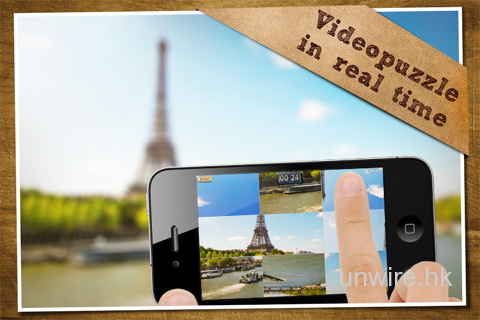
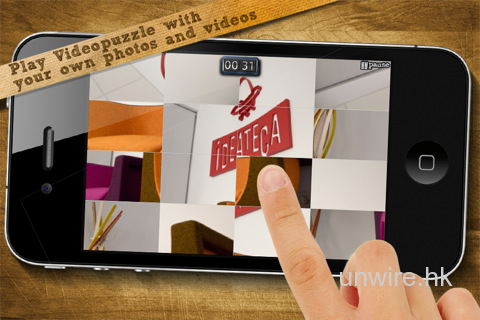
傳統的拼圖遊戲大家玩得多,來來去去都是以靜態的相片或卡通圖案為主的。而在開發商Ideateca的創意下,告訴了大家動態的短片也是可以拿來玩拼圖遊戲的,而且更可以一邊實時拍攝短片一邊玩,就是這個「VideoPuzzle!」App了。
「VideoPuzzle!」的玩法概念跟傳統的拼圖遊戲無異,就是要把打亂了的圖面 拼回原貌。「VideoPuzzle!」不單止可以讓用家匯入自己的靜態相片來玩之外。正如上文所說,就是可以匯入短片或實時地使用前置或後置鏡頭一邊把 目前畫面拍下,同時會把畫面調亂,等玩家一塊一塊地拼回原貌。
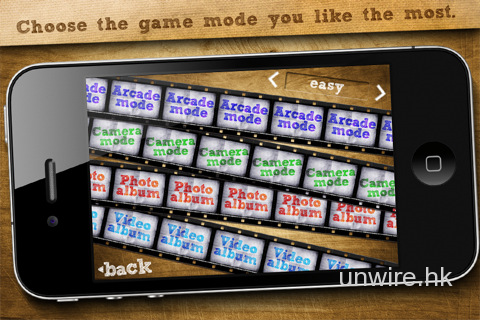
如果不想拍片的話也沒問題,「VideoPuzzle!」還有一個Arcade Mode,暫時內裡已有五段現成的短片,再細分為Easy,Normal 和 Hard三種等級讓你挑戰。
筆者提提大家,如果是匯入自己短片的話,畫面別太花太搖,否則只會自己玩死自己的 XD。
image image
image image
軟件下載:在App Store內搜尋「VideoPuzzle」 或到: iTunes App Store
QR Code下載:

軟件價格:USD0.99,限定時間內免費
適用環境:iPhone、iPod Touch、iPad
系統要求:iOS 4.1 +
檔案大少:16.7 MB
目前版本:0.9

(Quoted from: unwire.hk)

免費無限傳送SMS又一選擇,速度媲美WhatsApp!


在眾多個可免費"傳送SMS"的Messenger App中,論受歡迎程始終是老大哥WhatsApp。無可否認,有使用過的都知道WhatsApp優越的地方,如傳送訊息速度十分快。如果你還在找代替 品,筆者為你帶來了另一個同類App-「Kik Messenger」。
出名的除WhatsApp外,還有PingChat、Text Me、Kakao Talk等,如果覺得還沒有一個是你喜歡的話,也許這個「Kik Messenger」是你那杯茶。
「Kik Messenger」其實已推出了一段時間,目前版本已發展到4.0 (iOS)和2.1.0 (Android OS)版本。在推出短短的15天,用家數已達100萬。在香港人氣不及PingChat 或 Kakao Talk,WhatsApp就更不用說了。所以就讓筆者來把「Kik Messenger」介紹給更多香港讀者使用吧。
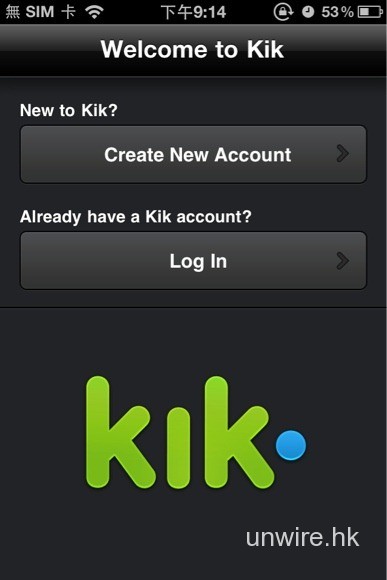
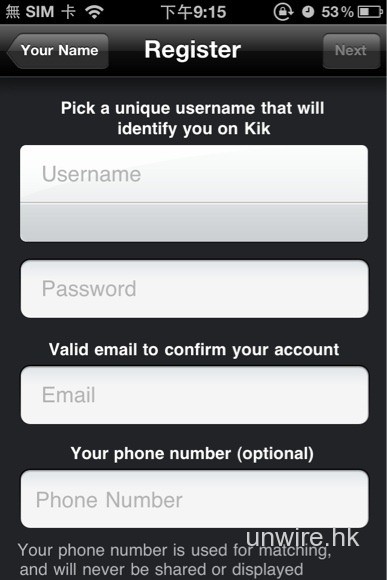
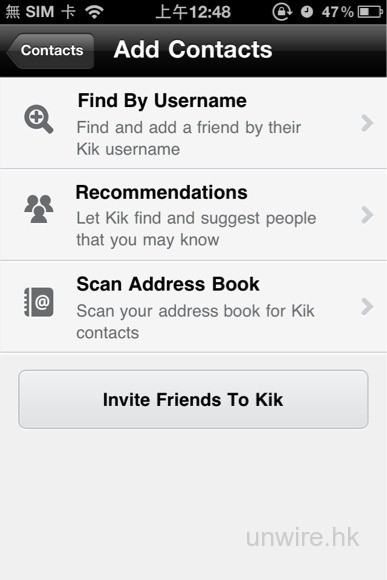
想在「Kik Messenger」上增加朋友有很多方法,可以註冊一個獨立的用戶名,也可以登記電話號碼和電郵地址方便在電話簿裡的聯絡人資料自動配對自動增加朋友。
fr_962_size580 fr_964_size580
「Kik Messenger」還可以在朋友之間推薦一些你們之間可能會認識的朋友給你增加,就像Facebook上面的"People You May Know",所以不局限於自已圈子裡的朋友,更可以增加朋友的朋友。對於喜歡結交朋友的用家特別有用。
fr_966_size580 image
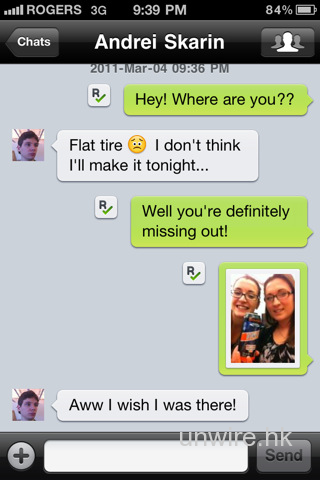
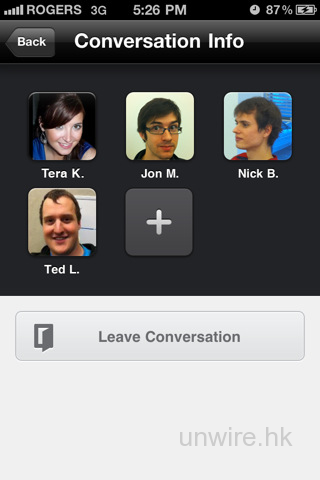
新版本的「Kik Messenger」已增加Group Chat (群組聊天),功能上已趕上了潮流,不讓WhatsApp專美。而且新版本大大提升了訊息傳送速度。筆者在Wifi 環境下使用後覺得速度已可以媲美WhatsApp,基本上一按傳送對方已即時收到。
image image
目前最大優勢還有是免費而且沒有廣告,執行速度也非常快。缺點就是目前在亞洲地區用戶比較少,在香港就更加少。所以如果你使用後覺得不錯的話,可以推薦給身邊的朋友使用。老實說,筆者有用WhatsApp,但沒好感,因為WhatsApp比起其他同類App太吃電了!!

軟件下載:iOS : iPhone/iPod Touch/iPad 版,Android OS 版
QR Code下載:
iOS: Android:
軟件價格:免費
適用環境:iPhone、iPod Touch、iPad、Android OS
目前版本:iOS (4.0),Android OS (2.1.0)

(Quoted from: unwire.hk)